
Dev docs
Note: This page is transparent to regular users — ParticleViz handles preprocessing and publishing automatically. It is here for developers and anyone who wants a deeper look at how the tool works internally.
See also Configuration for all settings and Quick Start to run your first dataset.
Documentation site (GitHub Pages)
The docs at olmozavala.github.io/particleviz are built with docs/build_site.py and served as static HTML from the docs/ folder (.nojekyll disables Jekyll).
After editing markdown under docs/, rebuild and commit the generated HTML:
uv run python docs/build_site.py
Optional: enable Settings → Pages → Build and deployment → GitHub Actions so .github/workflows/docs.yml deploys on push without committing HTML.
Local preview:
uv run python docs/build_site.py --local
python -m http.server 8083 --directory docs
Then open http://localhost:8083/.
Code flow
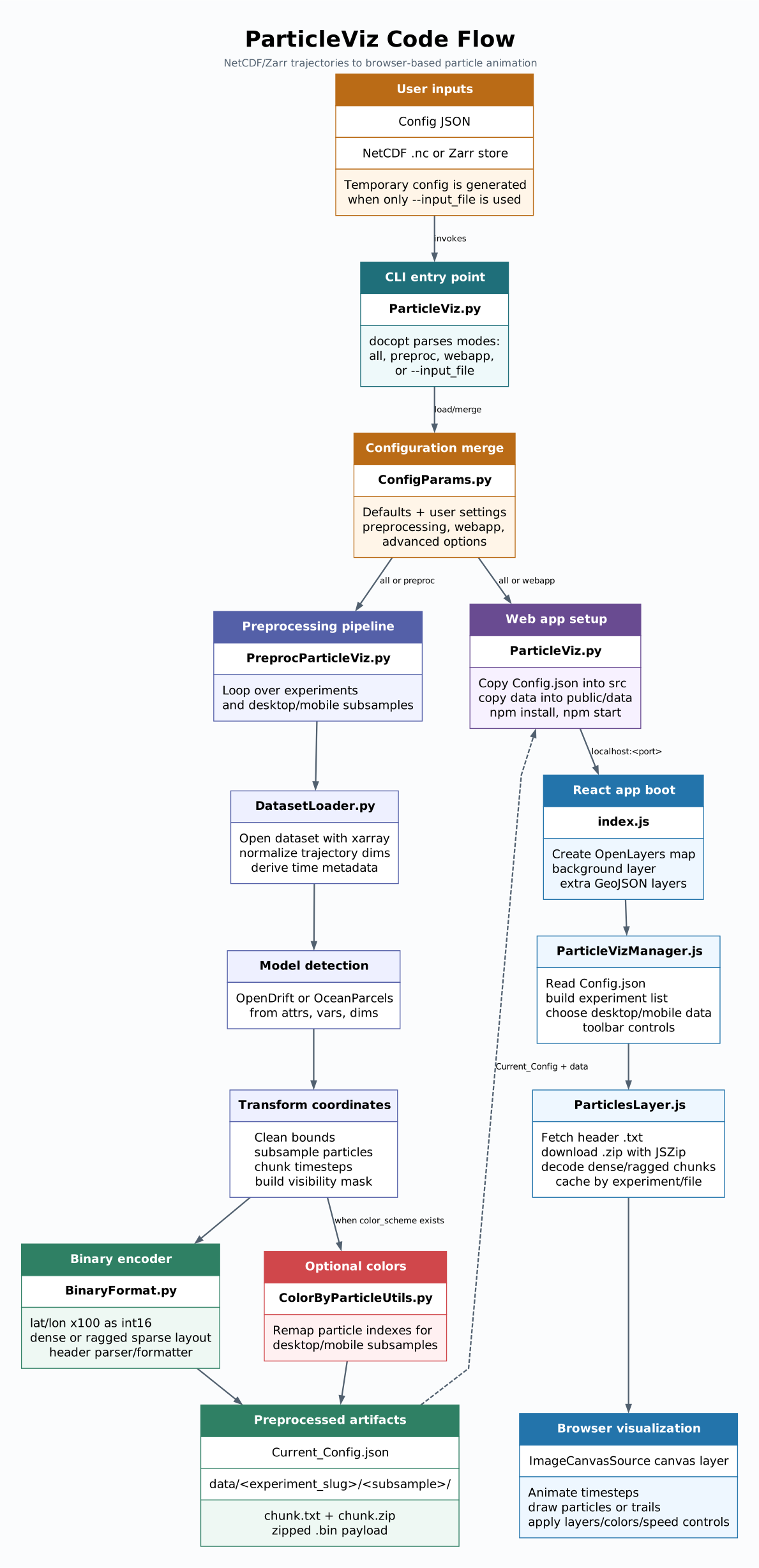
ParticleViz visualizes Lagrangian particle data (from OceanParcels, OpenDrift, or convention-compatible NetCDF/Zarr outputs) on the web. The process involves three main stages: configuration, preprocessing, and web app deployment.
1. Entry Point: ParticleViz.py
The main CLI tool uses docopt to handle different modes:
all: Runs both preprocessing and web app setup.preproc: Runs only the preprocessing stage.webapp: Runs only the web app setup (assuming preprocessing is done).
2. Configuration Management
ConfigParams.py: Defines default settings for both preprocessing and the web app.- Merge Logic: User-provided configuration files are merged with the defaults recursively. This ensures that even a minimal config can be used, with the system filling in the blanks.
- Dynamic Configuration: If a user provides only a dataset path (
--input_file), ParticleViz generates a temporary configuration on the fly.
3. Preprocessing: PreprocParticleViz.py
This is where the heavy lifting happens for data conversion.
- Model Detection: Automatically detects OceanParcels vs OpenDrift from dataset attributes and variable names (works for NetCDF and Zarr).
- Subsampling: To ensure performance on different devices, it generates two versions of the data:
- Desktop: A higher-resolution subsample.
- Mobile: A lower-resolution subsample for better performance on mobile browsers.
- Binary Conversion:
- Converts Lat/Lon coordinates into 16-bit integers (scaled by 100) to minimize file size.
- Uses a ragged sparse layout when particles contain NaNs, storing only visible positions per timestep.
- Partitions the data into chunks (default 50 timesteps per file).
- Saves data in binary format (
.bin) accompanied by a metadata header (.txt). - Zips the binary files (the web app expects
.zipfiles). - Writes each experiment under
ParticleViz_WebApp/data/<experiment_slug>/<subsample>/.
- Color Schemes: If a specific color scheme is provided,
ColorByParticleUtils.pyadjusts the particle indexes in the scheme to match the subsampled data.
See Binary file format and Color Schemes for full specifications.
4. Web App Setup
Current_Config.json: This file is generated during preprocessing and contains the final merged configuration, including paths to the generated data files.- Asset Deployment:
Current_Config.jsonis copied to the web app's source folder asConfig.json.- Generated data chunks are copied to the web app's
public/datadirectory.
- Server Initialization:
- Checks for
node_modulesand runsnpm installif necessary. - Runs
npm startto launch the React development server on the port set inadvanced.port(default3000).
- Checks for
Binary file format
ParticleViz preprocessing converts Lagrangian trajectory data into compact binary
chunks that the React web app loads on demand. Each chunk is shipped as a .zip
archive containing a single .bin file. A companion .txt header file sits
next to the archive and is fetched first by the browser.
Preprocessing flow
- Read NetCDF or Zarr trajectories (OceanParcels, OpenDrift, or compatible).
- Subsample particles separately for desktop and mobile clients.
- Split the time axis into chunks (default: 50 timesteps per file).
- Write one header (
.txt) and one zipped binary payload (.zip) per chunk. - Store outputs under
ParticleViz_WebApp/data/<experiment_slug>/<subsample>/.
Header file (.txt)
Each header is a single CSV-like line with seven fields:
| Field | Type | Description |
|---|---|---|
| 1 | integer | Number of particles after subsampling |
| 2 | integer | Number of timesteps in this chunk |
| 3 | string | Simulation start date/time |
| 4 | string | Time unit (seconds, hours, days, …) |
| 5 | number | Time step magnitude in field 4 |
| 6 | boolean | True when the source data contains missing positions |
| 7 | boolean | True when the binary payload uses the ragged layout |
Example:
16150, 50, 2021-12-01T00:00:00, days, 1.0, True, True
Legacy files with only six fields are still supported; they are treated as dense
(ragged=False).
Dense binary layout (ragged=False)
Used when every particle position is valid for every timestep.
- Latitudes —
num_particles × timestepsvalues as signed 16-bit integers (degrees × 100, little-endian). - Longitudes — same shape and encoding as latitudes.
- Visibility mask (only when field 6 is
True) — one bit per particle/timestep pair, packed withnumpy.packbits(MSB first within each byte). The mask marks positions that should be drawn.
Ragged binary layout (ragged=True)
Used when many particles are inactive (NaN) for large parts of the simulation. Only visible positions are stored, which reduces download size and parsing time.
For each timestep in the chunk:
| Segment | Type | Description |
|---|---|---|
| Count | uint32 |
Number of visible particles at this timestep |
| Records | repeated count times |
uint16 particle index, int16 lat×100, int16 lon×100 |
All multi-byte integers are little-endian. The web app expands ragged data back into per-particle arrays and rebuilds the visibility mask while loading.
File naming
Given file_prefix = "pviz" and experiment name Global Litter:
ParticleViz_WebApp/data/global_litter/2/pviz_global_litter_00.txt
ParticleViz_WebApp/data/global_litter/2/pviz_global_litter_00.zip
The zip archive contains pviz_global_litter_00.bin.
Reading a chunk in Python
import zipfile
from ParticleViz_DataPreproc.BinaryFormat import decode_chunk, parse_header

with open("pviz_global_litter_00.txt") as header_file:
    header = parse_header(header_file.readline())

with zipfile.ZipFile("pviz_global_litter_00.zip") as archive:
    bin_name = archive.namelist()[0]
    payload = archive.read(bin_name)

num_particles, timesteps, *_ , has_nans, ragged = header
lats, lons, visible = decode_chunk(payload, num_particles, timesteps, has_nans, ragged)
PreprocParticleViz.testBinaryAndHeaderFiles() provides a quick visual check of
a processed chunk.